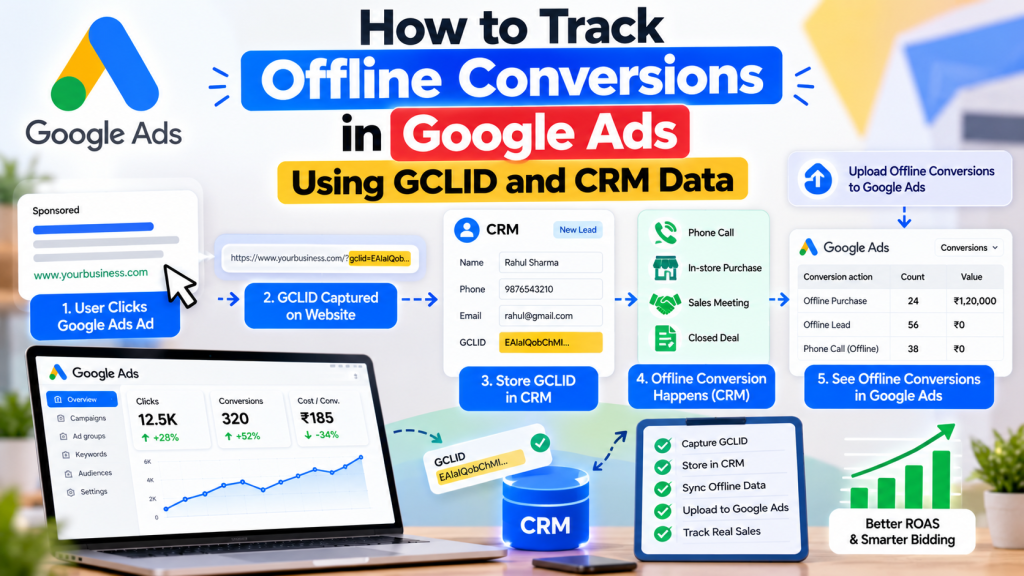
Are your Google Ads generating leads but you’re unsure which ones become paying customers?
Many businesses track form submissions and phone calls but fail to measure what happens afterward. A campaign might generate 100 enquiries, but only a few may turn into qualified leads or actual sales.
This is where Google Ads offline conversion tracking becomes important.
By connecting Google Click ID (GCLID) data with your Customer Relationship Management (CRM) system, you can identify which advertising clicks contribute to qualified leads and customers.
In this guide, you’ll learn how offline conversion tracking works, how to set it up, and how to use CRM data to improve your Google Ads performance.
What Is Offline Conversion Tracking in Google Ads?
Offline conversion tracking allows businesses to measure valuable customer actions that happen after someone interacts with a Google advertisement.
These actions may include:
- Leads qualified by your sales team
- Confirmed appointments
- Completed sales calls
- Signed contracts
- Purchases completed offline
For example, someone clicks your Google Ad, submits an enquiry form, and becomes a paying customer five days later.
Without offline conversion tracking, Google Ads may only record the initial form submission.
With offline tracking, you can import the customer’s later sales activity into Google Ads and connect it to the original advertising interaction where matching is possible.
What Is GCLID in Google Ads?
GCLID stands for Google Click Identifier.
It is a unique tracking parameter that Google Ads can attach to a destination URL when auto-tagging is enabled.
For example:
When someone clicks an eligible Google Ad, the GCLID helps identify that advertising interaction.
You can capture this identifier when the visitor submits a form and store it alongside their lead information in your CRM.
Later, when the lead becomes qualified or converts into a customer, the stored identifier can help Google Ads attribute the offline conversion.
Why Is Google Ads CRM Integration Important?
Integrating Google Ads with CRM data helps businesses evaluate actual lead quality rather than relying only on form submissions.
Key benefits include:
- Identifying campaigns generating qualified leads
- Measuring cost per qualified lead
- Understanding which leads become customers
- Improving conversion-based bidding signals
- Connecting advertising performance with actual sales
- Reducing optimization toward irrelevant enquiries
Professional Google Ads services often use offline conversion data to improve lead-generation performance and make better campaign decisions.
How to Set Up Google Ads Offline Conversion Tracking
Step 1: Enable Auto-Tagging
Open your Google Ads account and navigate to the account’s auto-tagging settings.
Ensure auto-tagging is enabled so eligible ad clicks can include the GCLID parameter.
Also verify that your website doesn’t remove click identifiers through redirects or other tracking configurations.
Step 2: Capture GCLID on Your Website
Configure your website to capture the GCLID from the landing-page URL.
For enquiry forms, you can store the identifier in a hidden form field.
When the visitor submits the form, the GCLID should be saved with the lead record.
Depending on your website, this may require Google Tag Manager, custom JavaScript, or CRM form integration.
Step 3: Store Lead Information in Your CRM
Your CRM should maintain relevant lead information, including:
| CRM Field | Purpose |
|---|---|
| Lead ID | Identifies the lead record |
| GCLID | Connects eligible ad clicks with leads |
| Lead Creation Date | Records when the enquiry arrived |
| Lead Status | Tracks qualification and sales progress |
| Conversion Time | Records when an offline action occurred |
| Conversion Value | Records the value of the completed action |
Platforms such as HubSpot, Salesforce, or other CRM systems can support these workflows through suitable integrations.
Step 4: Create an Offline Conversion Action
In Google Ads, navigate to Goals → Conversions and create a new conversion action.
Choose the relevant offline conversion category and select the option for CRM, file, or other offline data sources.
Create meaningful conversion actions such as:
- Qualified Lead
- Appointment Completed
- Converted Lead
- Sale Closed
Configure conversion values and counting settings according to your business goals.
Connect an appropriate data source through Google Ads Data Manager.
Step 5: Import Offline Conversion Data
Once a lead reaches the desired CRM stage, send the corresponding conversion information to Google Ads.
Depending on your implementation, the data may include:
- GCLID
- Conversion name
- Conversion date and time
- Conversion value
- Currency
- Unique order or event identifier
For enhanced conversions for leads, you can also use eligible first-party customer information, such as email addresses or phone numbers, following Google’s formatting and privacy requirements.
Import conversions using Google Ads Data Manager, a supported CRM connector, or an appropriate API integration.
Google recommends enhanced conversions for leads over relying exclusively on legacy GCLID imports.
Step 6: Verify Offline Conversion Tracking
After importing data, review your conversion action status and offline data diagnostics in Google Ads.
Check for:
- Missing or invalid click identifiers
- Incorrect conversion timestamps
- Conversion action name mismatches
- Duplicate conversion records
- Missing required customer information
- Import processing errors
Remember that offline conversions may take time to process and appear in reports.
How Offline Conversion Tracking Improves Lead Quality
Consider this hypothetical example:
| Metric | Campaign A | Campaign B |
|---|---|---|
| Ad Spend | ₹20,000 | ₹20,000 |
| Form Leads | 50 | 25 |
| Cost Per Lead | ₹400 | ₹800 |
| Qualified Leads | 10 | 20 |
| Cost Per Qualified Lead | ₹2,000 | ₹1,000 |
Campaign A appears more efficient when evaluating only form submissions.
However, CRM data shows that Campaign B generates twice as many qualified leads.
Offline conversion tracking helps advertisers understand this difference.
When imported conversion data is reliable, advertisers can use qualified-lead or sales outcomes to guide campaign optimization and Smart Bidding.
Best Practices for Google Ads Offline Conversion Tracking
To maintain accurate reporting, follow these recommendations:
1. Import conversion data regularly: Keep CRM and advertising data synchronized to avoid unnecessary reporting delays.
2. Use accurate conversion timestamps: Record when the actual qualification or sale happened.
3. Prevent duplicate conversions: Use unique identifiers and appropriate event deduplication methods.
4. Maintain consistent lead stages: Clearly define what counts as a qualified lead, appointment, or closed sale.
5. Protect customer information: Follow applicable privacy requirements and Google’s customer-data policies.
6. Use enhanced conversions for leads: Combine eligible first-party customer data with click identifiers wherever appropriate to improve matching.
Conclusion
Google Ads offline conversion tracking helps businesses understand what happens after someone submits an enquiry.
By connecting GCLID information with CRM data, advertisers can measure qualified leads, offline sales, and customer acquisition more accurately.
However, reliable tracking requires proper implementation, clean CRM records, and consistent conversion imports.
The real value of Google Ads isn’t simply generating more leads. It’s identifying which campaigns generate qualified prospects who eventually become paying customers.