Is your website not appearing in Google search results even after publishing new pages or blog posts? You’re not alone. Many website owners struggle with indexing issues that prevent their content from becoming visible in search engines.
If Google hasn’t indexed your website pages, they generally cannot appear in organic search results, regardless of how useful your content may be.
The good news is that many indexing problems can be identified and resolved through proper technical SEO.
In this guide, we’ll explain how to improve website indexing in Google, identify common issues, and share practical steps to help search engines discover your content.
What Is Website Indexing in Google?
Google indexing is the process through which Google analyzes website content and stores information about eligible pages in its search index.
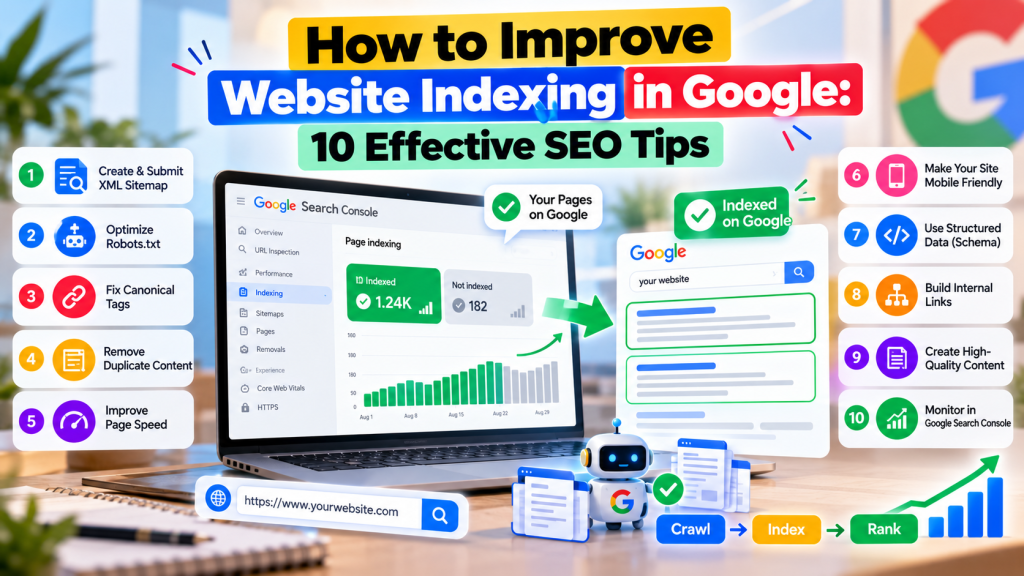
Google Search generally works through three stages:
- Crawling: Googlebot discovers and accesses website pages.
- Indexing: Google analyzes content and determines whether to include a page in its index.
- Ranking: Google selects and orders relevant indexed pages for search queries.
Indexing doesn’t guarantee higher rankings, but it is an essential step toward appearing in Google search results.
1. Check Website Indexing in Google Search Console
Before improving indexing, identify which pages are already indexed.
Open Google Search Console and navigate to:
Indexing → Pages
The Page indexing report shows indexed and non-indexed URLs along with reasons why certain pages aren’t indexed.
Common statuses include:
- Crawled – currently not indexed
- Discovered – currently not indexed
- Excluded by ‘noindex’ tag
- Duplicate, Google chose different canonical
- Not found (404)
Review the reasons carefully before making changes. Not every excluded page needs to be indexed.
2. Submit an XML Sitemap to Google
An XML sitemap helps search engines discover important website URLs.
For example, your sitemap might be available at:
https://example.com/sitemap.xml
To submit it:
- Open Google Search Console.
- Navigate to Indexing → Sitemaps.
- Enter your sitemap URL.
- Click Submit.
- Check for processing errors.
Ensure your sitemap includes relevant, canonical, indexable pages.
Submitting a sitemap helps Google discover URLs but doesn’t guarantee indexing.
3. Fix Robots.txt and Noindex Issues
Sometimes websites accidentally block search engines from accessing important pages.
Check your robots.txt file for unnecessary restrictions.
For example:
https://example.com/robots.txt
Also review whether important pages contain a noindex directive.
A noindex directive tells Google not to index a page. If you want the page indexed, remove the directive and ensure Google can crawl the URL.
Be careful not to remove intentional restrictions from private, duplicate, or low-value pages.
4. Improve Content Quality and Originality
Google may choose not to index pages that provide limited unique value.
Pages containing thin, repetitive, or nearly identical content can create indexing challenges.
To improve content quality:
- Publish original, helpful information.
- Address specific user questions.
- Avoid unnecessary duplicate pages.
- Include practical examples and useful explanations.
- Update outdated information when necessary.
Focus on content that genuinely helps visitors rather than publishing large numbers of similar pages.
5. Strengthen Internal Linking
Internal links help Google discover pages and understand their relationship to other content.
For example, a blog about Google Ads optimization can link to related articles about conversion tracking and lead generation.
Effective internal linking practices include:
- Linking new articles from relevant existing pages
- Using descriptive anchor text
- Including important pages in website navigation
- Fixing broken internal links
- Avoiding orphan pages with no internal links
Strong internal linking can improve content discovery and website navigation.
6. Fix Website Technical Errors
Technical problems can prevent Googlebot from accessing your website.
Common issues include server errors, incorrect redirects, inaccessible pages, and broken URLs.
Review Google Search Console for crawl and indexing problems.
Ensure important pages return an HTTP 200 status, load successfully, and don’t redirect unnecessarily.
If a page has been permanently removed, use an appropriate 404 or 410 response rather than forcing Google to index it.
7. Use Canonical Tags Correctly
Canonical tags help search engines understand which version of a page is preferred when similar or duplicate URLs exist.
For example, an e-commerce website might have multiple URLs displaying similar product information.
Use canonical tags consistently to indicate your preferred page.
However, remember that Google treats canonical tags as signals rather than absolute instructions.
Incorrect canonical implementation may result in Google selecting a different URL for indexing.
8. Improve Website Speed and Mobile Accessibility
Google primarily uses the mobile version of website content for indexing.
If important content or links are missing from your mobile website, Google may struggle to discover or understand them.
Make sure your website:
- Works properly on mobile devices
- Loads important content reliably
- Provides crawlable navigation links
- Avoids unnecessary technical restrictions
- Displays important text and information on mobile
Tools like Google PageSpeed Insights can help identify performance problems.
9. Request Indexing for Important Pages
If you’ve published a new page or fixed an indexing issue, you can request indexing through Google Search Console.
Follow these steps:
- Open the URL Inspection tool.
- Enter the complete page URL.
- Check its indexing status.
- Select Test Live URL if needed.
- Click Request Indexing when available.
Google may take several days or longer to process the request.
Submitting the same URL repeatedly doesn’t make indexing faster, and requesting indexing doesn’t guarantee inclusion.
10. Monitor Indexing Performance Regularly
Website indexing requires ongoing monitoring, especially when frequently publishing new content.
Check Google Search Console regularly to identify unexpected changes in indexed pages.
Pay attention to important URLs that remain excluded and investigate the underlying reasons.
For larger websites, technical SEO audits can help detect indexing problems related to duplicate URLs, internal linking, redirects, and crawl accessibility.
Professional technical SEO services can also help businesses diagnose complex indexing issues and improve their website structure.
Common Google Indexing Problems and Solutions
| Indexing Problem | Recommended Action |
|---|---|
| Discovered – currently not indexed | Improve internal discovery and check crawl accessibility |
| Crawled – currently not indexed | Review content quality, duplication, and relevance |
| Excluded by noindex | Remove noindex if indexing is intended |
| Duplicate page | Review canonical signals |
| Server error (5xx) | Fix hosting or server issues |
| Page with redirect | Check whether the destination URL should be indexed |
Conclusion
Improving website indexing in Google requires more than simply submitting URLs to Search Console.
A well-structured website, accessible pages, useful content, accurate sitemaps, and strong internal linking all contribute to better search engine discovery.
Regularly monitoring Google Search Console and fixing technical problems can help ensure your important pages remain eligible for indexing.
Remember, successful SEO isn’t about getting every website URL indexed. It’s about ensuring your most valuable pages are accessible, useful, and discoverable in Google Search.