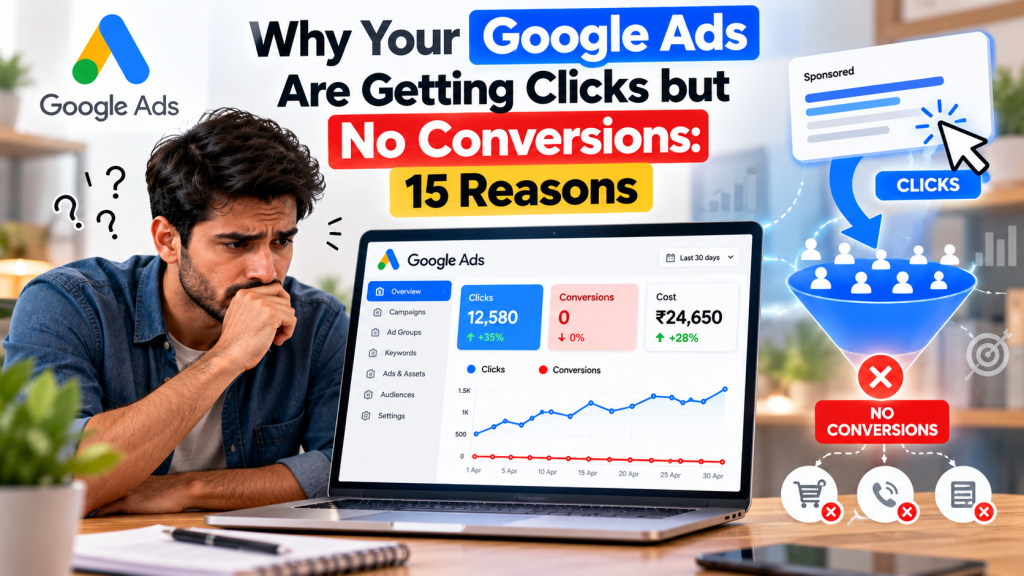
Are your Google Ads getting hundreds of clicks but generating no leads or sales? You’re spending money, attracting visitors, and seeing impressions increase, yet your conversions remain at zero.
This is one of the most frustrating problems businesses face with Google Ads.
The good news is that getting clicks but no conversions doesn’t always mean your campaign is failing. The problem could be incorrect targeting, irrelevant keywords, poor landing-page experience, or broken conversion tracking.
Understanding what’s going wrong is the first step toward improving your results.
Here are 15 common reasons your Google Ads aren’t converting and how to fix them.
1. You’re Targeting the Wrong Keywords
Not every keyword attracts potential customers. Some keywords bring users looking for information rather than people ready to buy.
For example, “how to repair an AC” attracts a different audience than “AC repair service near me.”
How to fix it: Focus on relevant, high-intent keywords that match your services and customer needs.
2. Your Ads Are Showing for Irrelevant Searches
Google Ads keyword matching can trigger ads for searches that don’t match your business goals.
These clicks consume your budget without generating valuable enquiries.
How to fix it: Review the Search Terms report regularly and add appropriate negative keywords to exclude irrelevant searches.
3. Your Landing Page Doesn’t Match Your Ad
Imagine clicking an ad for “emergency plumbing services” and landing on a general homepage with no clear plumbing information.
Visitors may leave because they can’t immediately find what they need.
How to fix it: Ensure your landing page matches the advertised service, keywords, and customer expectations.
4. Your Website Loads Too Slowly
A slow website can discourage visitors before they even explore your services.
This is especially important for mobile users who expect quick access to information.
How to fix it: Use Google PageSpeed Insights to identify performance issues. Compress large images, reduce unnecessary scripts, and improve mobile loading speed.
5. Your Call-to-Action Is Weak or Missing
Visitors need to understand what they should do next.
If your website doesn’t clearly explain how to enquire, book, or purchase, potential customers may leave.
How to fix it: Use visible, action-oriented CTAs such as “Get a Free Quote,” “Book an Appointment,” or “Request Pricing.”
6. Your Contact Form Isn’t Working Properly
Sometimes visitors attempt to submit an enquiry, but the form fails or displays an error.
This can result in lost leads even when the advertising campaign attracts relevant visitors.
How to fix it: Test form submissions on desktop and mobile devices. Verify that confirmation messages appear and enquiries reach the intended inbox or CRM.
7. Your Conversion Tracking Is Broken
Your Google Ads campaign may actually be generating enquiries, but incorrect conversion tracking prevents them from appearing in reports.
Common issues include missing Google tags, incorrect event triggers, or conversion actions configured improperly.
How to fix it: Check Goals → Conversions → Summary in Google Ads. Use Google Tag Assistant to test whether conversion events fire after successful actions.
8. You’re Targeting the Wrong Locations
A local business may receive clicks from users outside its service area if location targeting isn’t configured appropriately.
How to fix it: Review geographic performance and location settings. For businesses serving customers only in specific areas, consider targeting people physically present in those locations rather than those merely showing interest.
9. Your Ad Copy Creates the Wrong Expectations
Ads promising unrealistic pricing, discounts, or services may attract clicks from people who aren’t suitable customers.
How to fix it: Write honest, specific advertisements explaining what you offer, who it’s for, and why customers should choose your business.
10. Your Website Lacks Trust Signals
Visitors may hesitate to share personal information or make payments if your website looks unreliable.
How to fix it: Display genuine customer reviews, clear contact information, business details, relevant certifications, and transparent policies.
11. Your Pricing Doesn’t Match Customer Expectations
Users may click your ad expecting an affordable service but leave when they discover the price is outside their budget.
How to fix it: Communicate pricing clearly where practical. If you provide premium services, explain their value and important qualifications upfront.
12. Your Mobile Experience Is Poor
A website might look professional on a desktop but be difficult to navigate on mobile.
Small buttons, complicated forms, and poorly positioned CTAs can prevent conversions.
How to fix it: Test the entire mobile journey, including page navigation, form submission, WhatsApp links, and call buttons.
13. Your Bidding Strategy Doesn’t Match Your Goal
A campaign using Maximize Clicks focuses on generating clicks within its bidding constraints, not directly on maximizing conversions.
Even conversion-focused bidding can struggle when tracking data is inaccurate or campaign goals are poorly configured.
How to fix it: Choose a bidding strategy aligned with your objective. Consider Maximize Conversions when reliable conversion tracking is available, and ensure the correct actions are used for optimization.
14. You’re Attracting Visitors Who Aren’t Ready to Buy
Some searches indicate early research rather than immediate purchase intent.
For example, someone searching “best CRM software features” may still be comparing options.
How to fix it: Separate research-focused and high-intent keywords where appropriate. Tailor messaging to the user’s buying stage and prioritize high-intent searches when your main goal is immediate leads.
15. You’re Not Analyzing Campaign Performance Properly
Many advertisers focus only on clicks, impressions, and CTR while overlooking metrics that reveal why visitors aren’t converting.
How to fix it: Review conversion rates, search terms, landing-page performance, device data, and user engagement in Google Analytics 4.
Investigate the actual cause before changing bidding, targeting, or campaign structure.
How to Diagnose Google Ads Clicks but No Conversions
Use this quick troubleshooting checklist to identify potential problems.
| Problem | What to Check |
|---|---|
| Clicks but no recorded leads | Conversion tracking and form submissions |
| High clicks, low engagement | Search terms and landing-page relevance |
| Mobile clicks but no enquiries | Mobile usability and form functionality |
| High CTR, zero conversions | Ad messaging and search intent |
| Leads received but zero reported conversions | Tags, conversion goals, and reporting delay |
Start by checking whether enquiries are actually reaching your business. If they are, investigate tracking before making changes to your campaign.
Conclusion
Getting clicks but no conversions in Google Ads is a warning sign that something in your advertising or website conversion process needs attention.
The issue may involve irrelevant traffic, weak messaging, website usability, incorrect conversion tracking, or targeting the wrong audience.
Instead of making random campaign changes, identify where potential customers are dropping off and resolve the most important problems first.
Successful Google Ads campaigns aren’t measured by how many clicks they receive, but by how effectively those clicks turn into qualified leads, customers, and revenue.